-20250819-084018.svg)
How to manage technical documentation workflows in Confluence
Managing technical documentation in Confluence often involves more than just creating pages.
Teams need a way to:
-
review content before publishing
-
control when updates go live
-
maintain consistency across documentation
Without a clear workflow, this can lead to:
-
incomplete or unreviewed content being published
-
inconsistent documentation standards
-
difficulty maintaining quality as content scales
This guide walks through how to structure a technical documentation workflow using Workflows for Confluence, and how to get started quickly using workflow templates.
When do you need a documentation workflow?
You’ll typically need a workflow if your team:
-
publishes documentation for others to use (internal or external)
-
requires reviews before content goes live
-
wants to separate draft and published content
-
needs clearer ownership of updates
This is especially common for:
-
product and engineering teams
-
knowledge base owners
-
teams managing help centre content
The recommended workflow structure
For most documentation teams, a simple review → publish workflow is enough.
A typical structure looks like:
Draft → In Review → Approved → Published
What each stage means:
-
Draft
Content is being created or updated -
In Review
Content is ready for review by a stakeholder -
Approved
Content has been reviewed and is ready to publish -
Published
Content is live and visible to the intended audience
This structure helps ensure that content is reviewed before it’s shared, without introducing unnecessary complexity.
How to set this up in Confluence
Option 1: Start with a workflow template (recommended)
The fastest way to get started is to use a technical documentation workflow template.
When creating a new workflow:
-
Select a template when prompted (e.g. approval workflow)
-
Update the name of your workflow
-
Assign reviewers or approvers
-
Adjust status names if needed
-
Apply the workflow to your space or content
This gives you a working structure immediately, without needing to design everything from scratch.
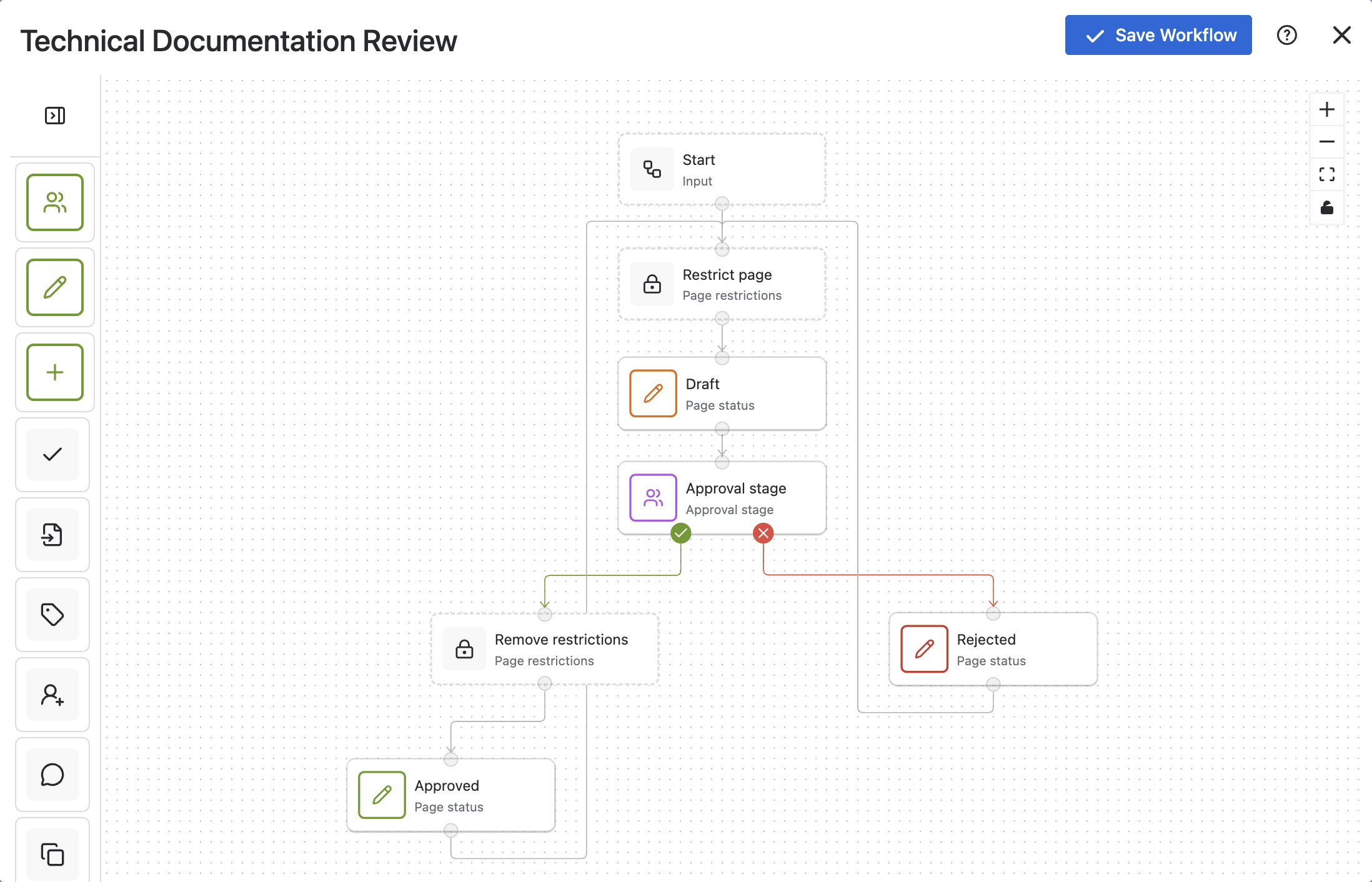
Option 2: Build from scratch
If you prefer to build your own workflow:
-
Create statuses:
-
Draft
-
In Review
-
Approved
-
Published
-
-
Define transitions by connecting Logic and Action stages:
-
Draft → In Review
-
In Review → Approved
-
Approved → Published
-
-
Assign ownership:
-
who can move content between stages
-
who is responsible for approvals
-
This approach gives full control, but typically takes longer to implement.
Best practices for technical documentation in Confluence
When setting up your workflow, keep things simple and scalable:
-
Start with a small number of statuses
-
Customise status names to reflect the language you use internally
-
Manually choose the colour of each stage to help differentiate
-
Only add additional steps if they’re genuinely needed
-
Keep approval processes clear and lightweight
-
Ensure ownership is defined at each stage
Overly complex workflows can slow down content creation and reduce adoption.
Getting up and running
If you’re setting up technical documentation workflows in Confluence, the simplest approach is:
-
start with a template
-
configure it to match your team
-
expand only where needed
This helps you move from setup to value quickly, while keeping workflows easy to manage as your documentation grows.