-20250819-084018.svg)
How to manage version control workflows in Confluence (for compliance and QMS)
Overview
For teams working in regulated environments, managing content in Confluence isn’t just about creating and publishing pages.
It’s about ensuring that:
-
changes are controlled and traceable
-
the correct version of a document is always visible
-
updates follow a defined review and approval process
While Confluence includes basic page history, many teams need a more structured approach to version control and document management.
This guide explains how to turn Confluence into a version-controlled quality management system (QMS), and how to support compliance using structured workflows in Workflows for Confluence.
When do you need version control in Confluence?
You’ll benefit from a version-controlled workflow if your team:
-
manages policies, procedures, or controlled documents
-
needs to distinguish between draft and official versions
-
requires traceability for audits or compliance
-
operates within a QMS or ISO-style framework ie. ISO 9001
This is especially relevant for:
-
compliance and quality teams
-
operations teams
-
organisations managing a Confluence QMS
The recommended workflow structure
The version control template focuses on creating and finalising official versions, rather than managing multiple review stages.
A typical structure looks like:
Draft → Create official version → Finalise official version → Current
What each stage means
-
Draft
Content is being created or updated -
Create official version
A new version of the document is formally created -
Finalise official version
The version is confirmed and locked as complete -
Current
The finalised version becomes the official, live version
This ensures that:
-
only finalised versions are marked as current
-
version creation is intentional and structured
-
document history is clear and auditable
How this works in practice
With this workflow, teams can:
-
work on updates in draft without affecting the current version
-
explicitly create a new official version when changes are ready
-
finalise that version before making it the current version
-
maintain a clear record of version progression over time
This is particularly useful for:
-
policies and procedures
-
controlled documents
-
quality management systems
How to set this up in Confluence
Option 1: Start with a version control workflow template (recommended)
The easiest way to implement this is to use a versioning template.
When creating a workflow:
-
select the version control template
-
configure who can create and finalise official versions
-
apply the workflow to your documentation
This provides a structured, repeatable approach without needing to design the workflow manually.
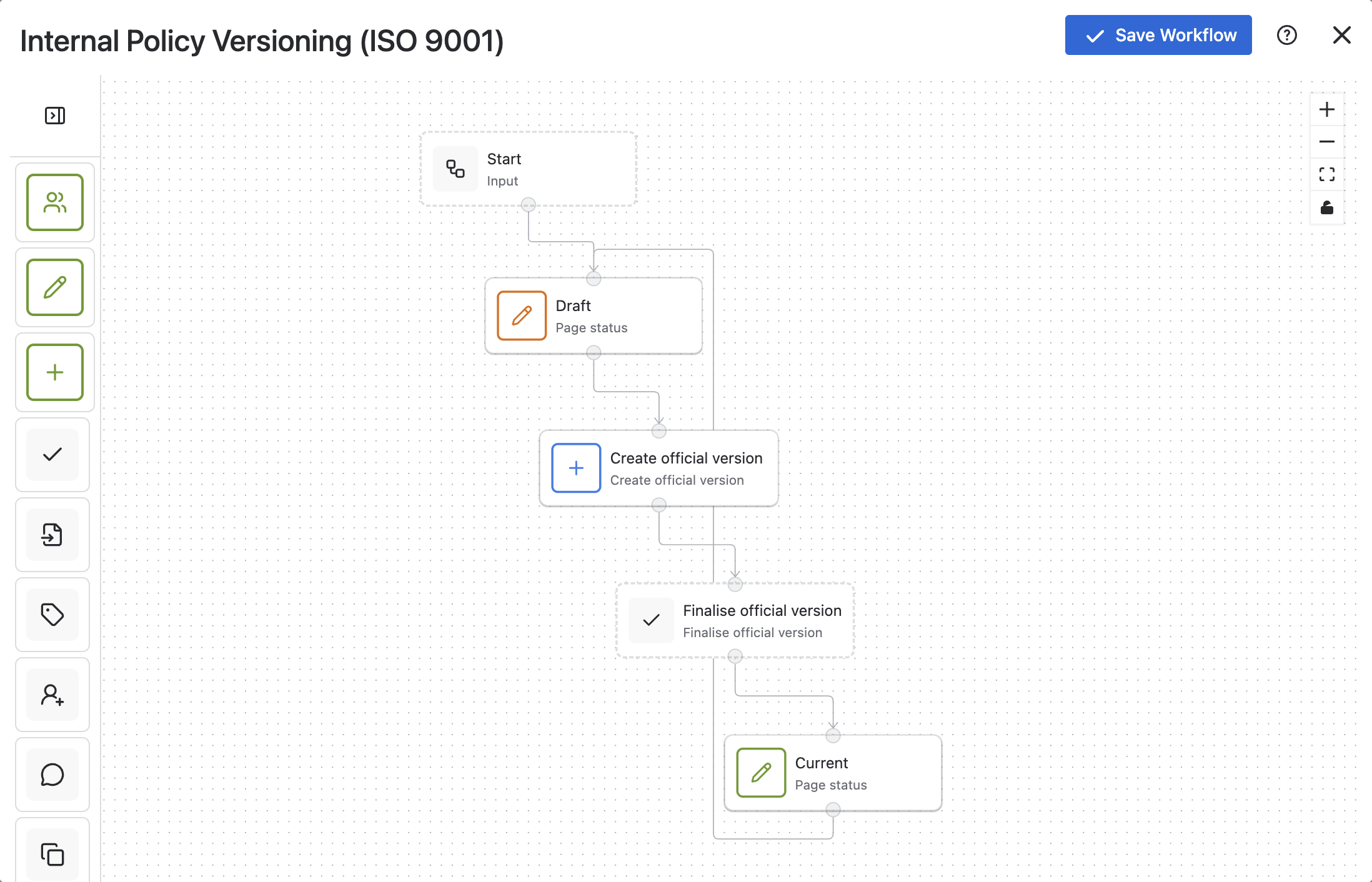
Option 2: Build from scratch
To replicate this setup, you can also do this manually in the no-code builder:
-
Define statuses:
-
Draft
-
Current
-
-
Add workflow steps:
-
Create official version
-
Finalise official version
-
-
Assign permissions:
-
who can create versions
-
who can finalise versions
-
This approach gives flexibility, but requires more setup. If you’d like to take it even further, you can even differentiate between major and minor versioning - a requirement often made by ISO 9001 and FDA 21 CFR Part 11.
Where approvals fit in
Some teams require formal approval before a version becomes official.
You can extend this workflow by adding an approval step, for example:
Draft → In Review → Create official version → Finalise → Current
This is useful when:
-
documents require sign-off from compliance or leadership
-
multiple stakeholders are involved
-
stricter governance is needed
However, many teams find that version creation plus finalisation alone provides sufficient control.
Common compliance use cases
Version-controlled workflows in Confluence are often used for:
-
Quality management systems (QMS)
Managing controlled documents with clear version history -
ISO-style documentation
Supporting structured versioning and audit requirements -
Policy and procedure management
Tracking updates and maintaining official versions
Best practices for version control in Confluence
To keep workflows effective:
-
clearly define who can create and finalise versions
-
use consistent naming for versions and statuses
-
avoid adding unnecessary workflow steps
-
ensure teams understand when to create a new version
The goal is to maintain control and traceability without overcomplicating the process.
Getting started
If you’re introducing version control into Confluence:
-
start with a versioning template
-
define who owns version creation and finalisation
-
apply the workflow to key documentation
-
add approvals only where required
This approach helps you introduce governance while keeping workflows practical and usable.