-20250819-084018.svg)
Pages can be classified using AI tools in order to reduce the friction on the end user while providing more consistency across your instance. Compliance offers two ways to classify documents using AI: you can utilise Rovo agents or activate built-in AI classification.
Learn more about these methods of classification below:
AI Classification Best Practices
As with any AI implementation, the quality and accuracy of the results can be improved by following some best practices. To ensure that all forms of AI classification perform well in your instance, the following is recommended:
Provide detailed level descriptions
As classification level descriptions are the most direct form of context available to the AI concerning the nature of each classification level, more detailed level descriptions can help yield more accurate classification results. You may wish to:
-
Start with a clear definition of what the classification level represents
-
Explain the business impact or sensitivity level of information that belongs in this category
-
Describe the typical organizational roles or departments that create or handle this type of information
-
Mention any regulatory requirements, compliance standards, or security protocols associated with this classification level
-
Include specific examples of content types, document formats and data categories that should receive this classification
For example:
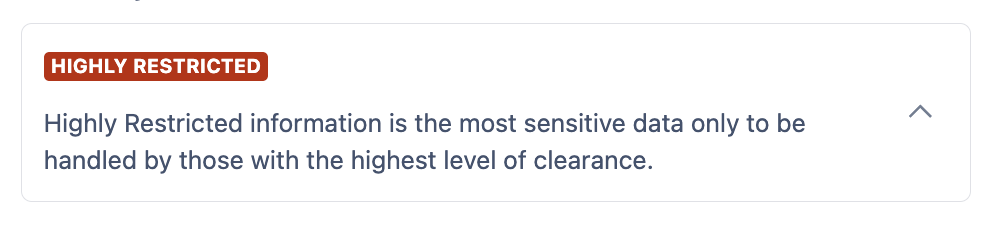
Low detail - less accurate results expected
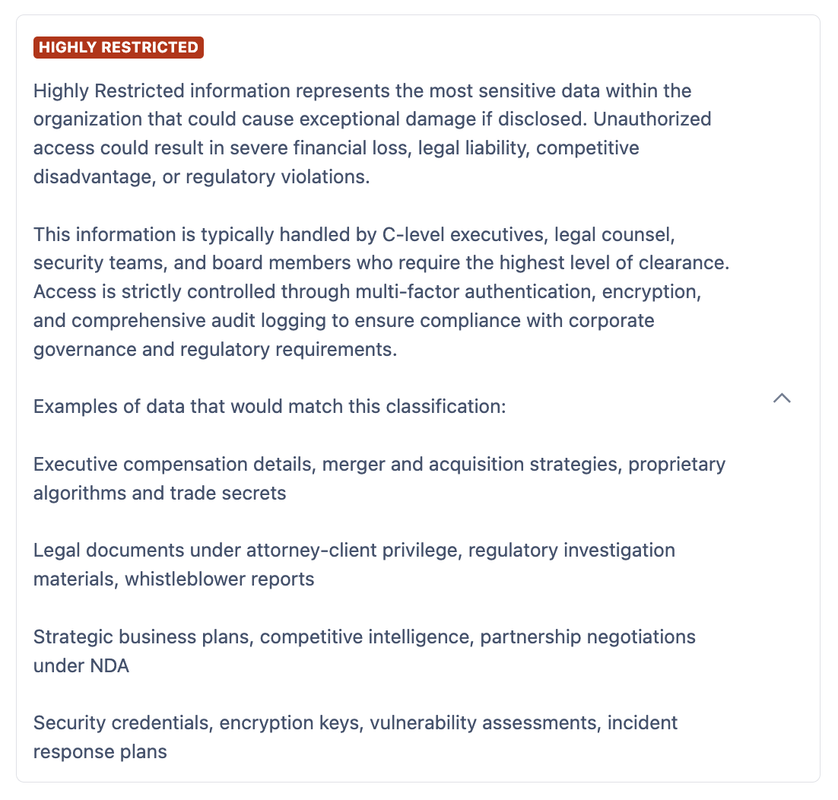
High detail - better results expected
AI Classification automatically analyses your Confluence pages and applies appropriate classification levels based on the content. When a page is created or updated, AI reviews the content and applies the most suitable classification level.
Use sub-levels
Sub-levels help the AI make domain-specific classifications beyond just the sensitivity of the content. For example, a “Confidential” level with sub-levels pertaining to the department with which the content lies: “HR”, “Sales”, “Development”, and so on.
As each sub-level has its own name and description, this can be used to provide additional detail and receive a more accurate classification recommendation without creating individual level descriptions that are overwhelmingly long.
Enable default classification
If you are using AI tools to automate the application of levels to pages in your instance instance, it is recommended that you enable Default Classification as well.
The default classification level you choose will serve as a fallback, so if there is not enough information for the AI to make a classification determination the default classification level can be applied and prevent any pages remaining unlabelled.
AI Classification Data Processing
Depending on which AI tools you choose to enable for processing, the nature of the data processing will vary.
When using Atlassian Rovo agents, page content does not leave Atlassian infrastructure, but AI actions to apply a classification level or otherwise interact with the Compliance for Confluence application are processed on AppFox infrastructure.
If using the built-in AI classification functionality, all information used to make a determination regarding page level (including titles, content, and space information) are sent to and analysed by a large language model hosted on AppFox infrastructure. Note that no data sent to this LLM is retained or used for model training.
All processing within AppFox infrastructure takes place inside the European Union.
For more information, see our FAQ on data processing and storage.
Need support? We’re here to help 🧡
If you have any questions or would like to speak with us about Compliance, please don’t hesitate to reach out to our Customer Support team.